








Platter: what is eating my disk, in one window
Hello there!
My disk fills up in the most boring way possible. There is no single giant file to blame. It is a hundred small decisions: a Rust project I built once, a node_modules folder in a repository I cloned for one afternoon, package caches, the system journal, Docker images, old downloads, the trash I never empty.
And every time the “low disk space” warning shows up, I go through the same routine. df -h to see how bad it is. du -sh * | sort -h in the home folder, then again one level down, then again. A separate command to check the journal, another for Docker, another for the package cache. A disk usage tool to get a picture, then back to the terminal to actually remove things, and a quick search to remember which of those folders are safe to delete.
None of it is hard. It is just slow, scattered across too many tools, and I never trust the result fully. So I built one place that answers the whole question at once.
What is Platter?
Platter is a desktop disk usage analyzer and cleaner for Linux, Windows and macOS. It scans a disk or a folder, shows how much space is left, what uses it, where, and which file types, and then suggests what can be cleaned, with a reason for every suggestion.
It runs fully on your machine. The only network calls are the optional download of the advisor model and the update check.
The screenshots here use made-up sample data, not a real disk.
How do I find out what is taking up disk space?
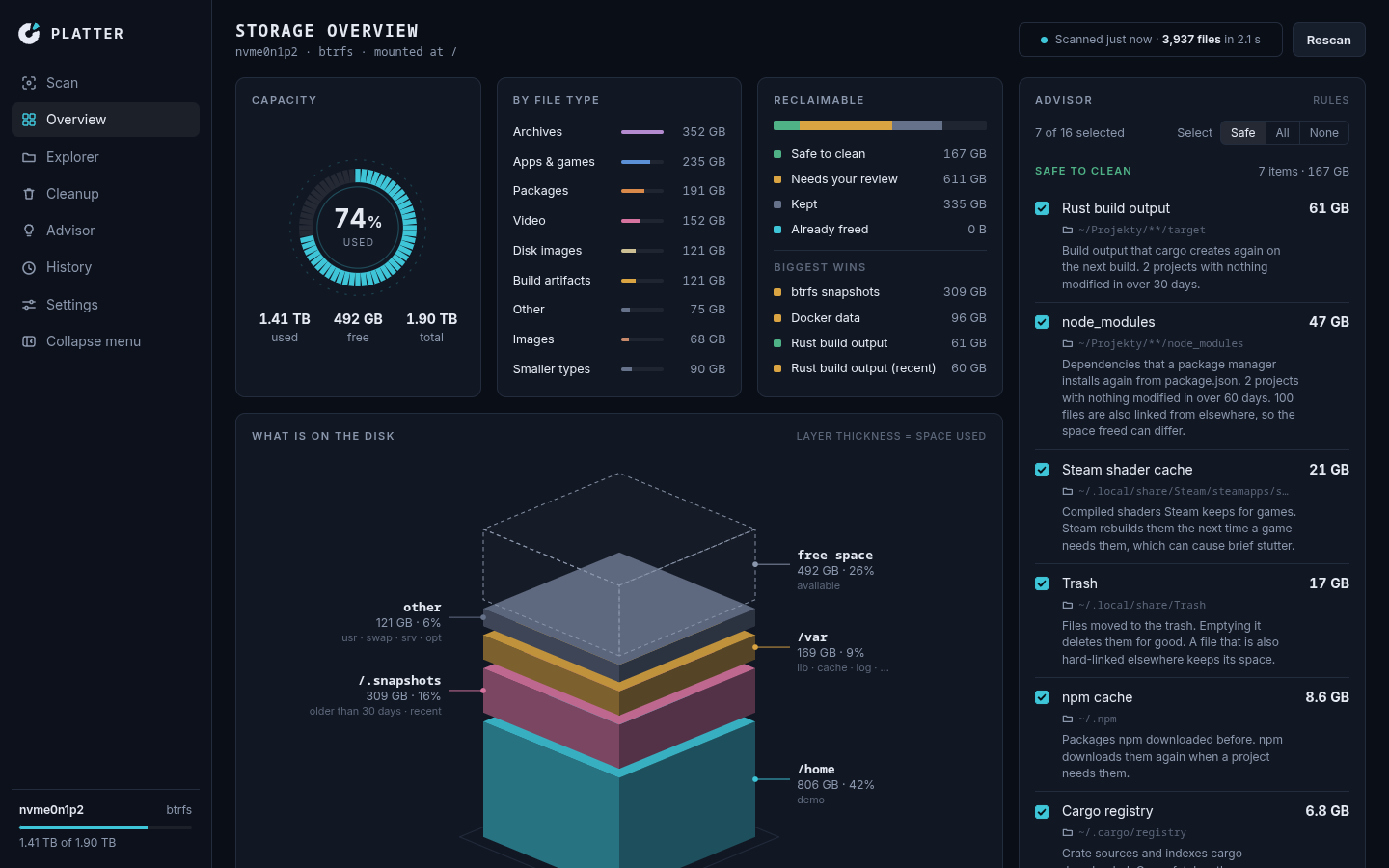
With Platter, you pick a disk or folder and press Scan. The overview then shows everything I used to collect by hand:
- Capacity: used, free and total, as a gauge,
- By file type: archives, apps and games, packages, video, disk images, build artifacts and the rest,
- Reclaimable: how much is safe to clean, how much needs your review, and how much is deliberately kept,
- What is on the disk: the “platter” itself, a stack of layers where the thickness of each one is the space it uses.
The Explorer goes one level deeper. Every folder is a column you can rotate in 3D, or a flat nested map if you prefer something calmer. The History view samples the disk once a day while the app is open, and shows how it grows with and without the cleanups.
The scanner tries hard to count the way du does, so the numbers agree with the tools I already trust. It never follows symlinks, counts a hard-linked file once, and keeps both the size on disk and the file length. On btrfs it enters subvolumes that belong to the same disk, without counting anything twice. A folder it cannot read is counted as an error and the scan carries on.
Rules with a reason, not a guess
The suggestions come from a table of rules. Each rule has a title, a verdict and a reason you can read in the app. There are three verdicts:
- safe: things that come back by themselves. Rust
targetfolders next to aCargo.tomlwith nothing modified in over 30 days,node_modulesnext to apackage.jsonand a lockfile, Python caches, and the npm, pnpm, Yarn, Bun, Cargo, Gradle and Go caches, - review: things that are probably fine to clean, but could hold something you cannot download again.
~/.cache, the Maven repository, the pacman cache, the system journal, Docker data, btrfs snapshots, old downloads and disk images, - keep: things Platter deliberately leaves alone and tells you so. Documents, Pictures, Videos, Music, the Desktop and the Steam library.
You can add your own rules too: “always keep this folder” or “this folder is safe to clean”. A keep always wins, and a folder you mark safe still has to get past every protection below.
Cleaning without surprises
This is the part I cared about most, because a cleanup tool that deletes the wrong thing once is a tool you never open again.
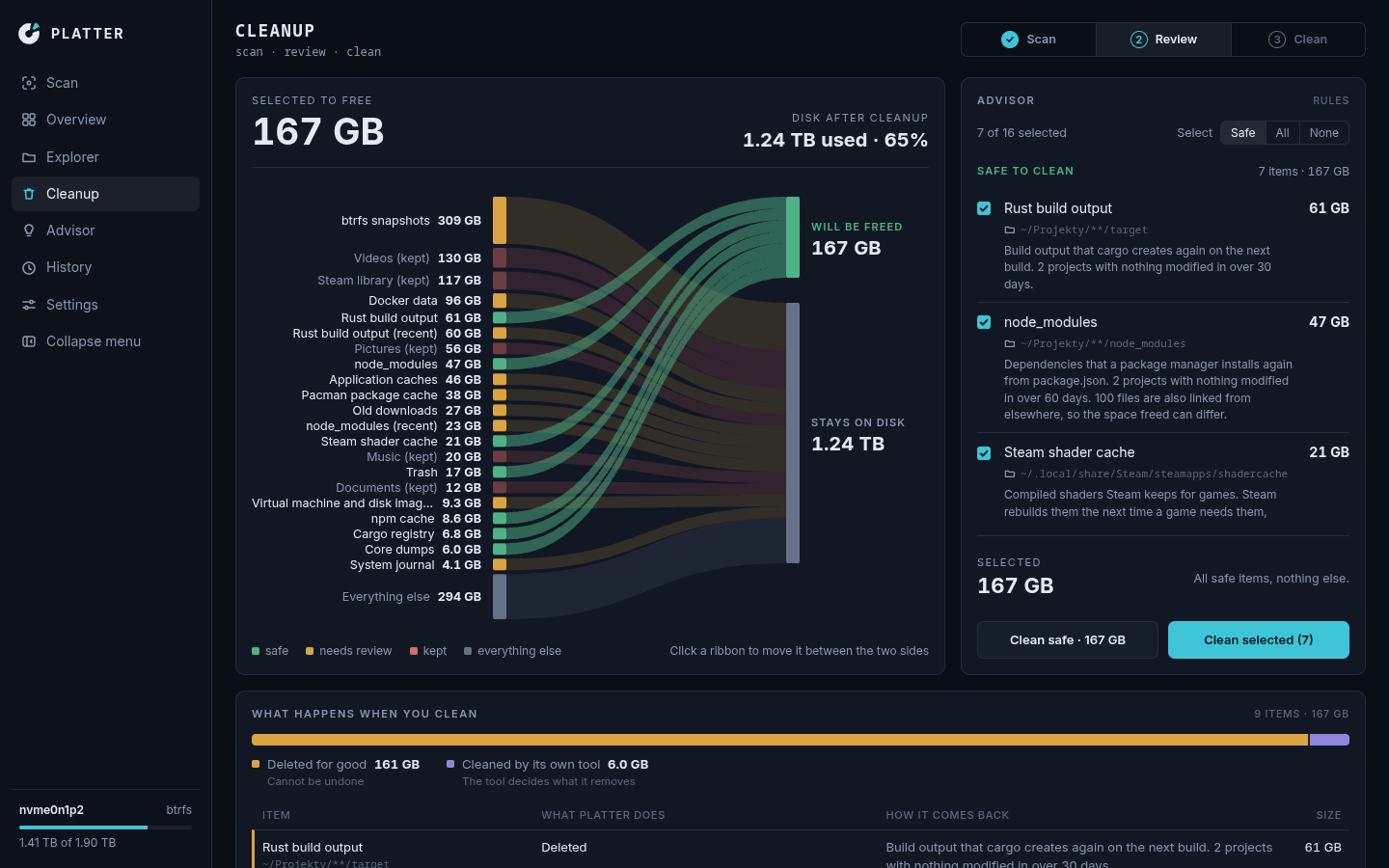
The cleanup page shows, before anything happens, what will be done to each item. Build output and node_modules are deleted for good, and the page says that this cannot be undone. Caches and package stores are emptied but the folder stays. Your own data, such as old downloads and disk images, goes to the trash, so you can put it back from the History. And some things are cleaned by the tool that owns them, with fixed arguments: paccache -rk2, apt-get clean, dnf clean packages, journalctl --vacuum-time=2weeks and docker system prune --force.
Under that there is a guard that refuses a lot. Nothing inside ~/.ssh, ~/.gnupg, ~/.config, /etc, /usr or your personal folders can be a target, and those places are also compared by identity, so a bind mount or a link does not sneak past them. Every target is checked again right before it is touched: if a file changed since the scan, or the Cargo.toml next to a target folder is gone, it is skipped. And the “freed” number at the end is the real change in free space on the disk, not the sum of what the plan hoped to remove.
A small AI model that never presses delete
Rules cover the usual suspects, but every disk has folders that no rule knows about. For those, Platter has an Advisor: a small language model, Qwen3.5-4B, that runs on your machine. It labels unknown folders, explains a single folder when you ask about it, and answers questions about the scan.
I kept it on a short leash on purpose:
- it is an opt-in download of about 2.7 GB from Hugging Face, asked for in a native dialog, and checked against a fixed SHA-256 before it is ever loaded,
- its labels are at most “review”, never “safe”, and never pre-selected,
- it can never touch anything a rule keeps, and it never deletes anything itself,
- for free questions the model only turns your question into a query. Platter writes the answer itself from the scan and the rules, so the model never picks a path, a number or a verdict.
On Linux the model can use a graphics card through Vulkan, and on macOS through Metal. On Windows it runs on the processor only. Without the download, Platter works the same, just without the Advisor.
Install it
Platter runs on Linux and Windows 10 and 11 on 64-bit x86, and on macOS 13 or newer on Apple Silicon. On Linux and macOS:
curl -fsSL https://github.com/MSpiechowicz/platter/releases/latest/download/install.sh | shOn Windows, in PowerShell:
irm https://github.com/MSpiechowicz/platter/releases/latest/download/install.ps1 | iexThese install for your user only, ask for no administrator rights and update themselves. There are also deb and rpm packages, and the README explains each option, including the unsigned Windows setup, the macOS Full Disk Access prompt, and how to uninstall.
If you prefer the terminal, there is a headless platter-cli with scan, suggest and clean, where clean either prints the plan with --dry-run or carries it out with --yes, and refuses to do anything without one of them.
Under the hood, and the honest status
Platter is a Rust workspace: a core crate with the scanner and the domain, a small platform layer for the OS-specific parts, separate crates for the rules, the cleanup, the history and the advisor, and a Tauri 2 desktop app with a Svelte 5 and TypeScript frontend. It is free software under the GPL-3.0.
It is also early development. Every change on main that passes CI is released automatically, so things move quickly and the details above can change. The code is on GitHub.
One window instead of ten commands
That is really the whole idea. Not a new way to delete files, but one place to see where the space went, why each folder is there, and what happens when you clean it. The next time the warning pops up, I open one app instead of retyping the same chain of commands.
Greetings,
Maciej