Useful Timer: a countdown with a little character

Oct 1, 2026
Hello there! 👋
I created Useful Timer, a small desktop app for animated countdowns. Set a timer for work, a break, cooking, or whatever needs a deadline, and keep it on your screen. The countdown is still the point, but it does not have to be just a number in a box.
For this project, I focused on detailed artwork and polished animation. A burning fuse, falling sand, or a flower slowly opening gives the passing time a little character, while the remaining time stays visible.
Eight ways to watch time pass
The app currently has eight styles, each with its own animation and completion sound. They are not simply different colors around the same clock:
- Bomb burns down its fuse, then finishes with sparks and smoke.
- Hourglass drains its sand and flips over when the countdown ends.
- Rocket counts down to a launch and flies out of view.
- Code Rain surrounds the countdown with streaming green characters.
- Machine Core rotates metallic rings around a glowing red lens.
- Dragon Orb gently turns a golden glass orb with four red stars.
- Crescent Wand floats with falling sparkles and lights up at the crystal when time is up.
- Clockwork Bloom opens its porcelain-and-gold petals as time runs out.
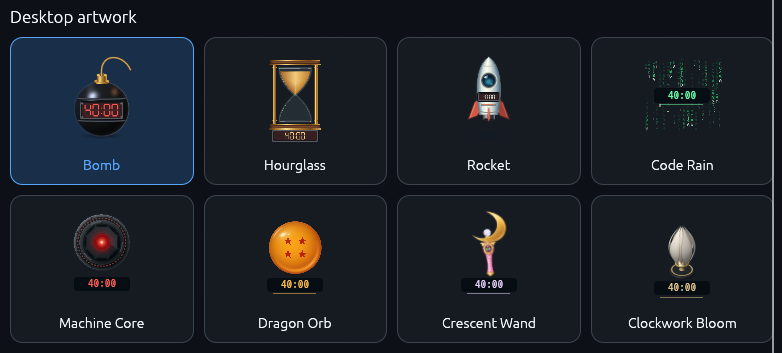
You can switch a timer’s artwork without restarting its countdown. The visual style is a choice, not a reason to lose the time already elapsed.
More than one timer, without more accounts
You can run several timers at once, each with its own name and sound. Drag them around the desktop, resize them, or lock them in place. Right-click the artwork or title to start, pause, resume, reset, or remove a timer.
The control panel keeps your timers together and lets you change their settings. Enter hours, minutes, and seconds, pick a duration preset, or save your preferred duration as the default for new timers. If a running or paused countdown needs a little more time, use Adjust remaining time. Changing its configured Duration instead resets it to the new full duration.
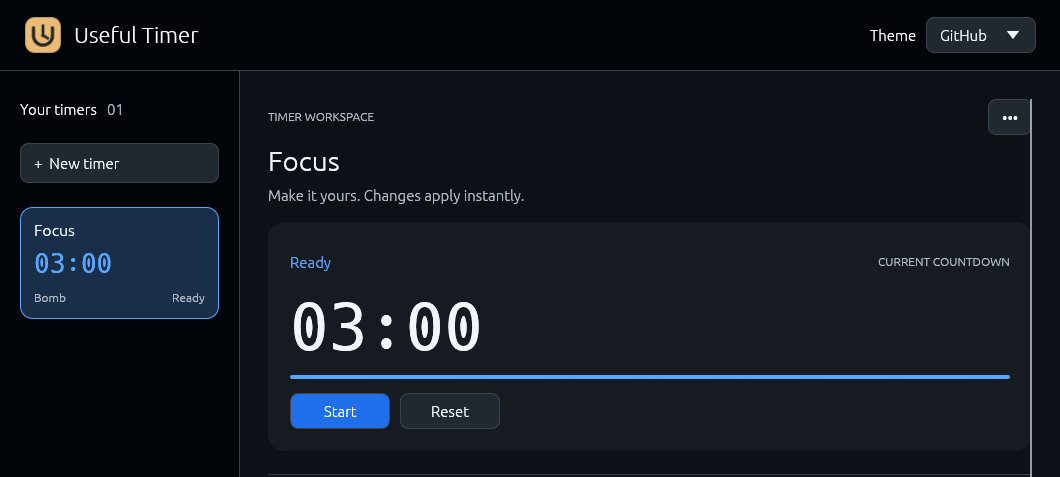
Animation should also be optional when it becomes distracting. Reduced motion keeps time and progress visible with less animation, and each timer has volume and mute controls for its completion sound. The control panel offers two dark themes: the blue-accented GitHub theme and the warmer Charcoal theme.
Local settings, with a few important boundaries
Useful Timer is built in Rust with egui/eframe. Timers, positions, movement locks, theme, and your preferred new-timer duration are saved on your computer. There is no account, analytics, or cloud sync, and countdowns work offline.
Saved settings are not saved countdown progress, though. Reopening the app restores timers stopped at their full duration, and closing the control panel quits all timers. They do not keep running in the background. The app also checks GitHub for updates at startup, so offline countdowns do not mean the app never makes a network request.
Give it a try
You can download the latest release without installing Rust. Open the app, choose + New timer, give it a name and artwork, set the duration, and select Create timer. Then press Start.
Desktop behavior has been verified on Linux. Windows, Intel Mac, and Apple Silicon Mac builds are available, but their desktop behavior still needs native testing. Linux downloads require a 64-bit Intel/AMD system with glibc 2.39 or newer; desktop widgets use X11 or XWayland, not native Wayland, and their placement and always-on-top behavior depend on the window manager. Releases are unsigned, so Windows and macOS may show security warnings.
The repository and installation guide have the full setup details and source code under GPL-3.0-only. If you try it, feedback about the animations and desktop behavior is welcome.
That is all for now. Stay healthy and keep coding!
Greetings,
Maciej